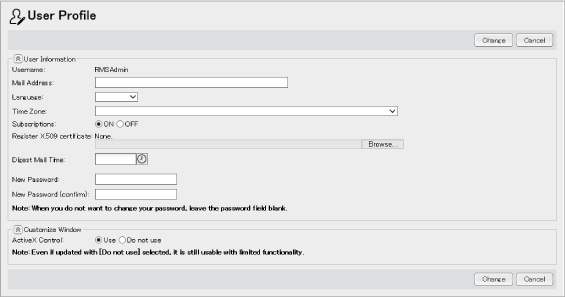
The information of the user who is currently logged in can be confirmed on the [User Profile] window. The following information can be confirmed on the [User Information] area.
Viewing or changing [Mail Address], [Language], [Time Zone], [Subscriptions], [X.509 Certificate], and [Digest Mail Delivery] may not be allowed depending on the settings of the Portal Administrative Application.
The user can also change his or her password in the window.
The setting whether or not ActiveX control is used can be confirmed or changed on the [Customize Window] area.
Fig.: [User Profile] window
The pull-down menu contains licensed languages only.
When no X.509 certificate has been registered, the input field for registration and the [Browse] button are displayed.
When an X.509 certificate has already been registered, the information on the registered certificate and the checkbox for deletion are displayed.
When unset, time is not displayed. The digest message will be delivered at 0:00.
Passwords may not be changed depending on the settings of Resource Management Application.
Enter the same password in both textboxes. If the both entries do not match, an error occurs when clicking the [Change] button.
You may not be able to change the ActiveX control depending on the setting of Resource Management Application.
The [Confirm Password] dialog box may not be displayed depending on the settings of Resource Management Application.