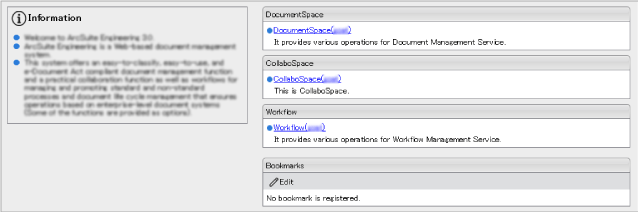
The [Portal] window is the gateway to access the ArcSuite system. The following operations can be performed in the [Portal] window.
The [Portal] window allows you to access the following functions and components.
Fig.: [Portal] window
The [Portal] window consists of three frames: upper frame, left frame, and right frame. The pages below are displayed in the respective frames.
In the Bulletin Board page, the "Information" about ArcSuite is displayed.
The Component List page allows you to access DocumentSpace, CollaboSpace, Workflow, Printer, and Bookmarks.
In the Component List page, the following items are displayed.
| Item | Description |
|---|---|
| [DocumentSpace] area | Displays the list of DocumentSpace available for the logged-in user. Clicking the link of the DocumentSpace name displays the [Document Service List] window.
For details of operations in DocumentSpace ➯ <DocumentSpace Help> |
| [CollaboSpace] area | Displays the list of CollaboSpace available for the logged-in user. Clicking the link of the CollaboSpace name displays the top window of CollaboSpace.
For details of operations in CollaboSpace ➯ <CollaboSpace Help> |
| [Workflow] area | Displays the list of Workflow available for the logged-in user. Clicking the link of the Workflow name displays the top window of Workflow.
For details of operations in Workflow ➯ <Workflow Help> |
| [Printer] area | Displays the list of Printer available for the logged-in user. Clicking the link displays the [Printer] window. |
| [Bookmarks] area | Displays the link list of URLs registered as bookmarks by the login user. To register or edit "bookmarks", click the [Edit] button.
For details on how to edit bookmarks ➯ "Editing Bookmarks" |